How the SpinLink subscription works (and why it's crypto)
The SpinLink subscription is paid in USDC (a digital dollar) straight from your own wallet. No credit card, no account with a third party: you connect your wallet, sign a free authorization, and the renewal happens by itself every month.
This guide explains why we built it this way, and walks you through every screen.
Why crypto instead of a card?
Let’s be honest: mainstream payment processors (Stripe, PayPal and friends) exclude the adult content industry. Even when everything is legal and above board, an account can be frozen or closed overnight — with the funds inside. If you work in OFM, you’ve probably heard the story already.
Rather than building your business on rails that can drop you, we chose a system where nobody can turn off the tap:
- Your money stays in your wallet. SpinLink never holds your funds — we only pull your monthly subscription, on the day it’s due, and nothing else. (That’s what non-custodial means.)
- No bank in the middle. No frozen account, no surprise shutdown, no “high-risk industry” paperwork.
- It works worldwide, with near-zero fees.
- You keep full control: you can revoke the authorization at any time, for free, from SpinLink or from any independent tool.
The 4 words you need to know
No crypto expertise required — these four concepts are all you need:
- USDC: a digital dollar. 1 USDC = $1, always. It’s not Bitcoin going up and down: it’s a stable dollar, just in digital form.
- Base: the network (built by Coinbase) your USDC moves on. Fast, reliable, and transactions cost a few cents.
- Wallet: your digital purse (MetaMask, Rainbow, Coinbase Wallet…). You alone hold the keys — not SpinLink, not anyone else.
- The authorization (allowance): the equivalent of a bank direct-debit mandate. You set a cap; SpinLink can only pull your monthly subscription, never more — and you can cancel the mandate whenever you want.
Before you start
You need two things:
- A wallet. If you don’t have one, install MetaMask, Rainbow or Coinbase Wallet (5 minutes, free).
- USDC on the Base network — at least one month’s worth of subscription.
No USDC? No stress: the app guides you through getting some right inside the payment flow (more on that below). And good news: you don’t need ETH or any other crypto for “network fees” — SpinLink pays them for you.
Activating your subscription, step by step
Everything happens on the subscription payment screen, at the end of account setup. At the top, a summary shows your plan, your models and your monthly price.
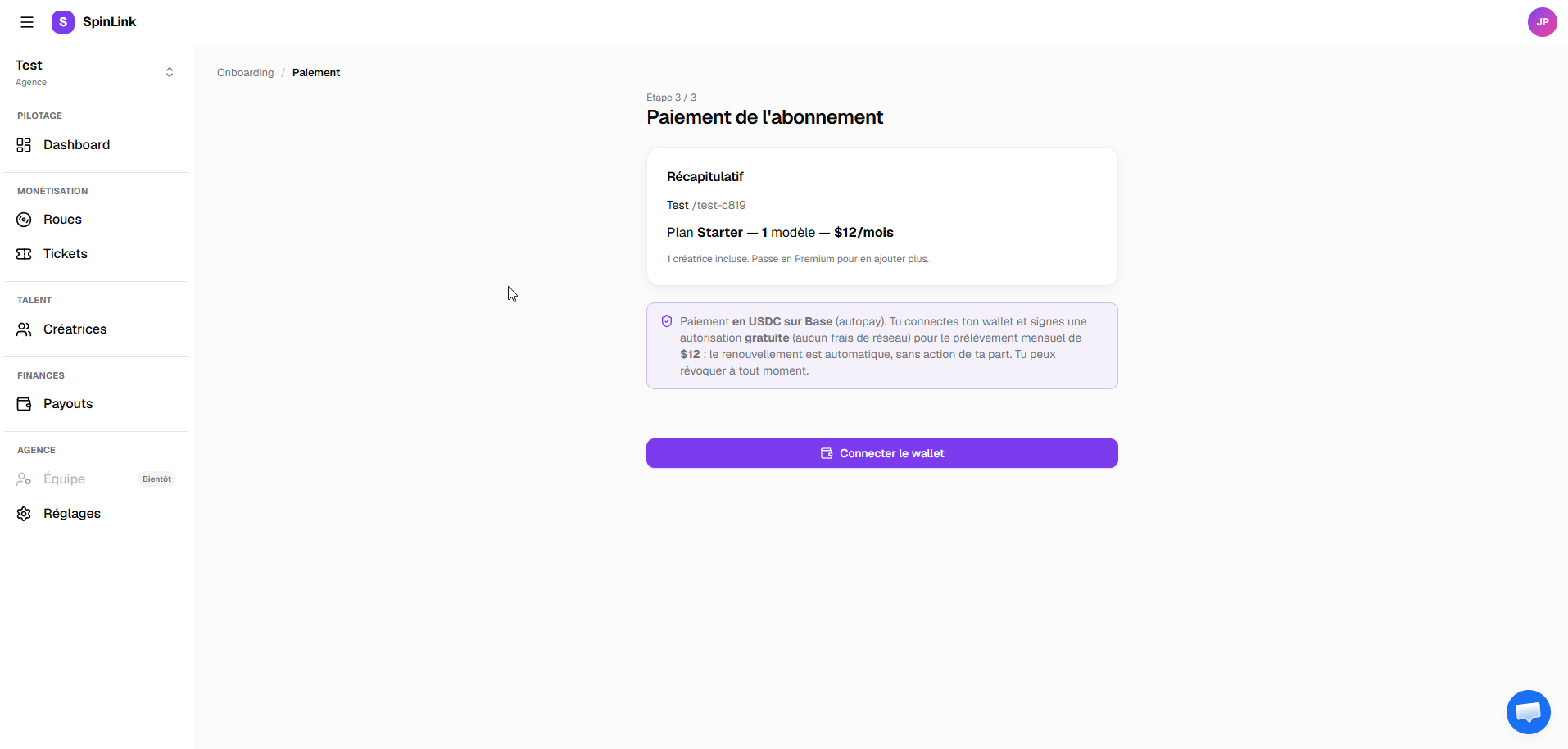
Step 1 — Connect your wallet
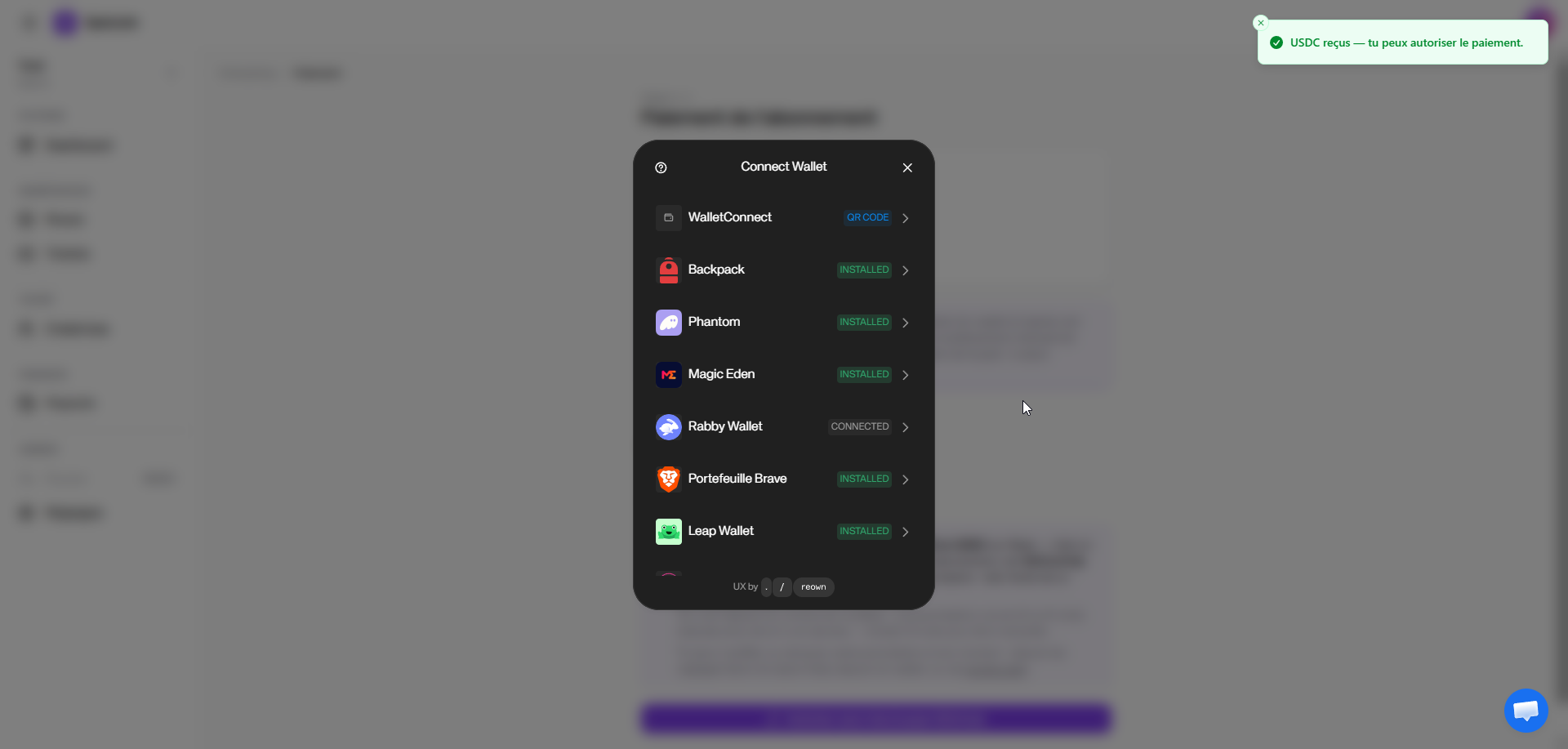
Click “Connect wallet”. A window opens with the list of compatible wallets — pick yours and approve the connection. At this point, no signature and no payment is requested: we just connect, that’s all.
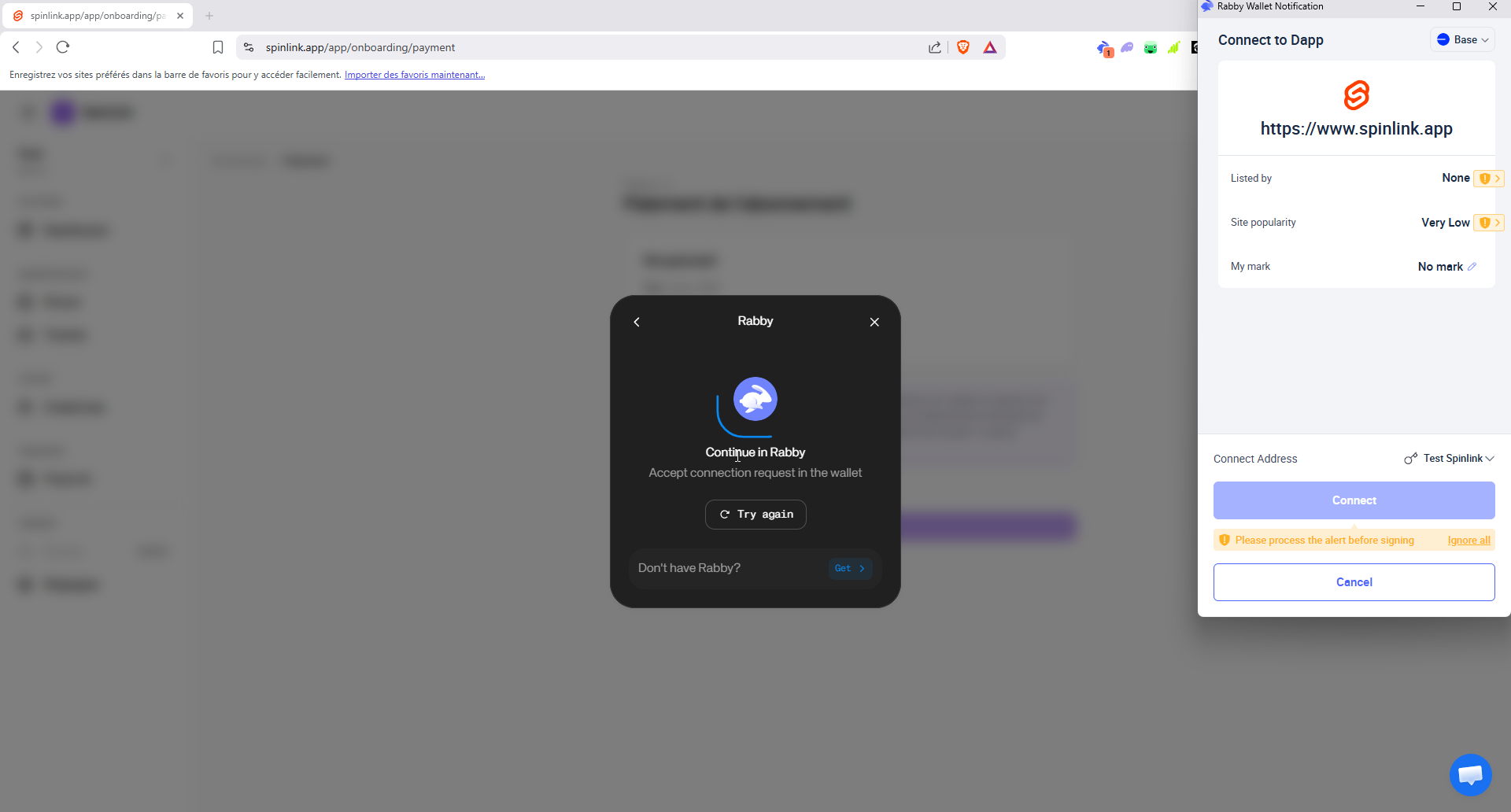
Your wallet then asks you to confirm the connection to the site — check that the address shown is spinlink.app, then approve.
Step 2 — Balance check (automatic)
As soon as your wallet is connected, SpinLink checks that you have enough USDC for the first month. If you do, you go straight to step 3.
If you’re short, the “Need USDC?” panel appears with three paths, from simplest to most complete:
- I have ETH or another crypto on Base → convert it to USDC without leaving the page (“Convert to USDC” button).
- My crypto is on another blockchain → move it to USDC on Base in a few minutes via Relay or Jumper (the destination is already pre-filled).
- I don’t have any crypto → buy USDC by card or bank transfer through a third-party provider (that provider will ask for an identity check).
Meanwhile, the page keeps watching your balance: the moment the USDC lands, it unlocks by itself — no refresh needed.
Step 3 — Pick your authorization duration
Before signing, you choose for how many months you authorize the debit: 1, 3, 6 or 13 months (13 recommended). The total authorized amount is shown in plain sight.
One important point, because it’s THE question everyone asks: that amount is a cap, not a payment. We only pull your monthly subscription, once a month, on the same day of the month as your first payment. The rest is just an authorization reserve: it simply saves you from re-signing every month. A longer duration = peace of mind for longer; a shorter one = a lower cap but an earlier re-signature. Either way, it’s free and takes ten seconds.
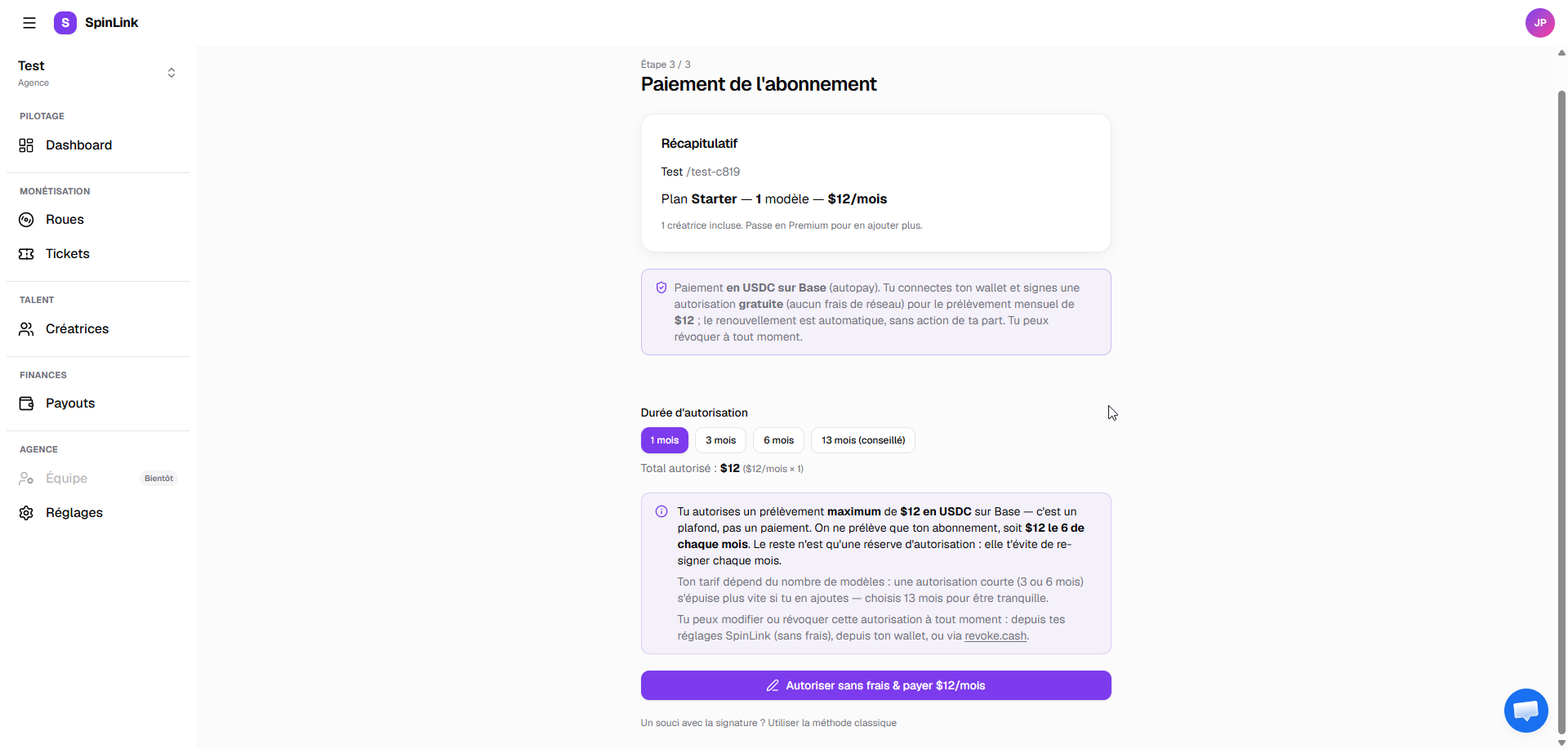
Step 4 — Sign (free, really)
Click “Authorize for free & pay … /month”. Your wallet shows a signature request — not a transaction: you’re signing a message, it costs nothing, and you don’t need ETH. SpinLink relays the signature and pays the network fees on your behalf.
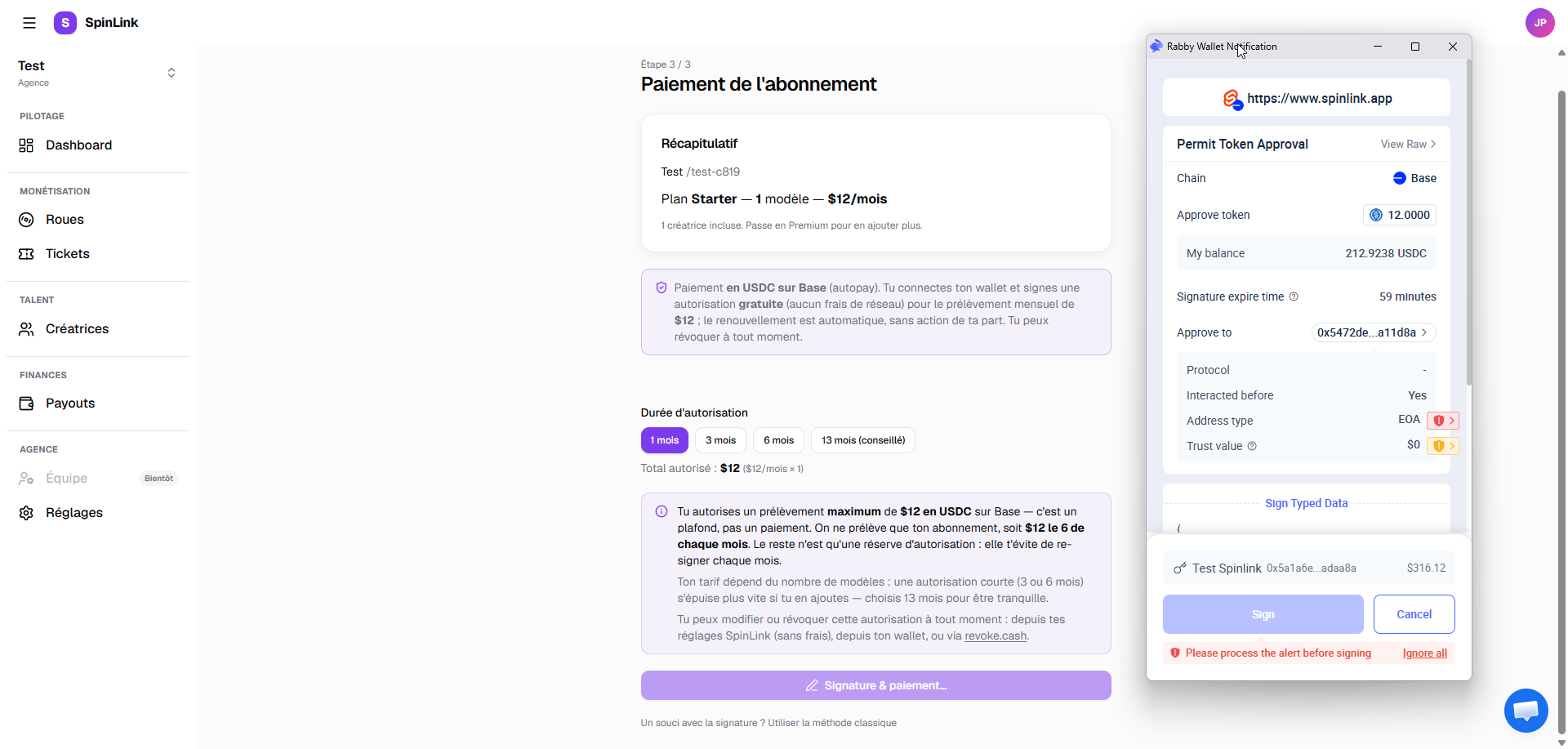
Your wallet doesn’t support this kind of signature? Rare, but it happens. In that case, a “Classic method” box offers to authorize via a classic transaction — that one does require a little ETH on Base for fees (a few cents).
Step 5 — First payment and activation
Right after your signature, SpinLink pulls the first month and activates your account. Off to the dashboard: your subscription is live, and there’s nothing left for you to do. 🎉
And every month after that?
Renewal is 100% automatic: every month, on your anniversary date, SpinLink pulls your subscription from your wallet. No action, no notification to deal with — as long as your wallet has the balance and the authorization is running, everything just works.
What if a payment fails? (insufficient balance, or authorization exhausted/revoked):
- A banner shows up in your dashboard: “Payment overdue. Top up your wallet or re-authorize the debit before suspension.”
- You have 7 days to fix it — top up your wallet with USDC, or re-authorize with one free signature.
- After that, the account is suspended: wheels and drops are paused (your data doesn’t move). As soon as a payment goes through again, everything reactivates automatically.
Managing your subscription day to day
Everything lives in Settings → Subscription. At a glance you can see:
- your plan and your monthly amount;
- your next renewal date;
- your paying wallet (with a link to the blockchain explorer, so you can verify for yourself);
- the health of your authorization: how many months are left before you need to re-sign. When fewer than 2 months remain, the app flags it in red.
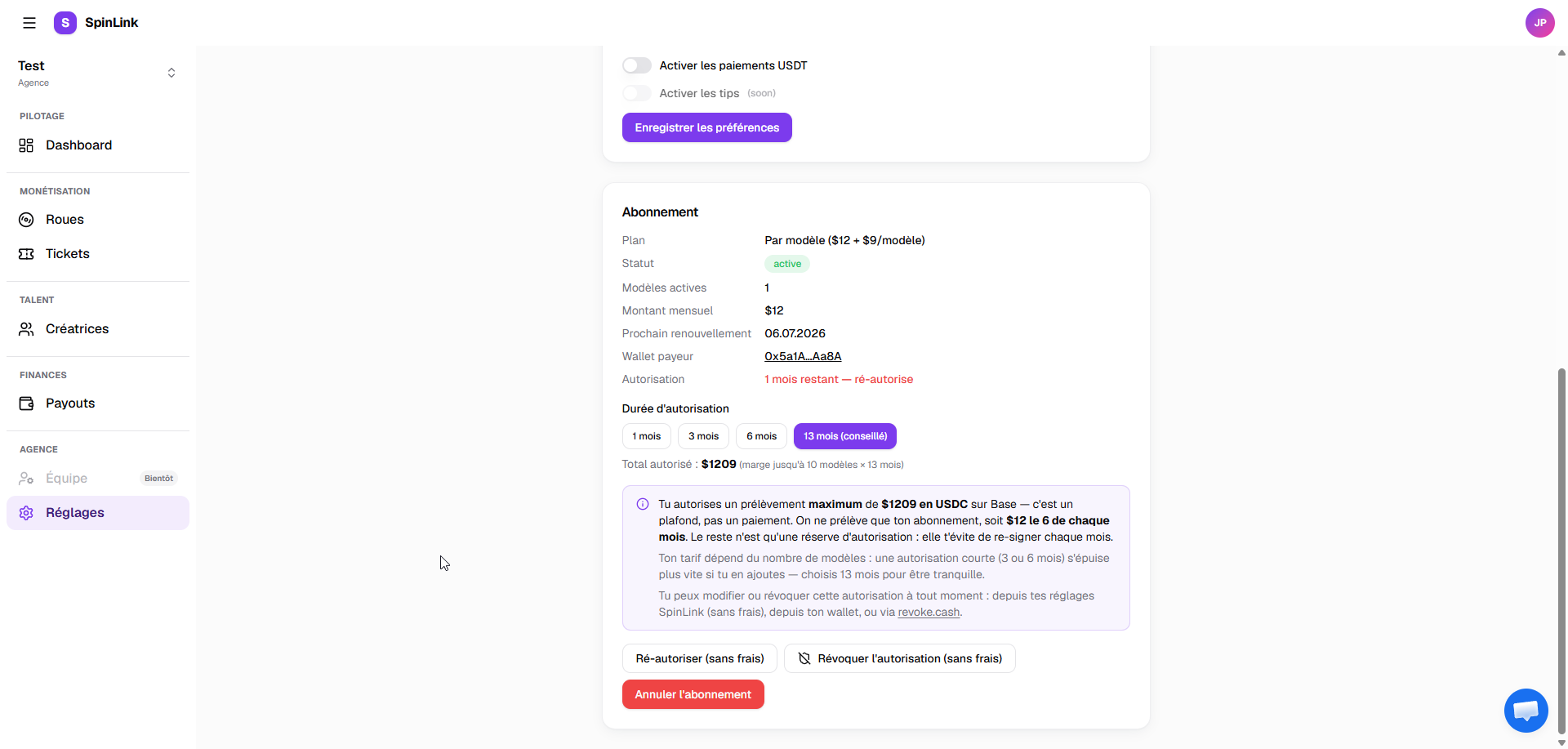
From this page, you can:
- Re-authorize (free): top up your authorization with one free signature — same flow as onboarding, 1/3/6/13-month presets included.
- Switch wallets: cancel, then run the authorization flow again from the new wallet.
- Cancel the subscription: see below.
Cancelling — and taking back full control
You can cancel at any time, in one click, via “Cancel subscription”. Your account stays active until the end of the current cycle, then no more debits go out.
One detail that matters: after cancelling, your debit authorization technically stays open on the blockchain — that’s the whole point of a system where you control your wallet, not us. To be fully at ease, revoke it:
- The “Revoke authorization (free)” button in your settings: one free signature, and the cap drops back to zero on-chain. No debit possible anymore, full stop.
- Or via revoke.cash, a tool independent from SpinLink — the app gives you the direct link to your wallet. Same result, but you pay the small network fee yourself.
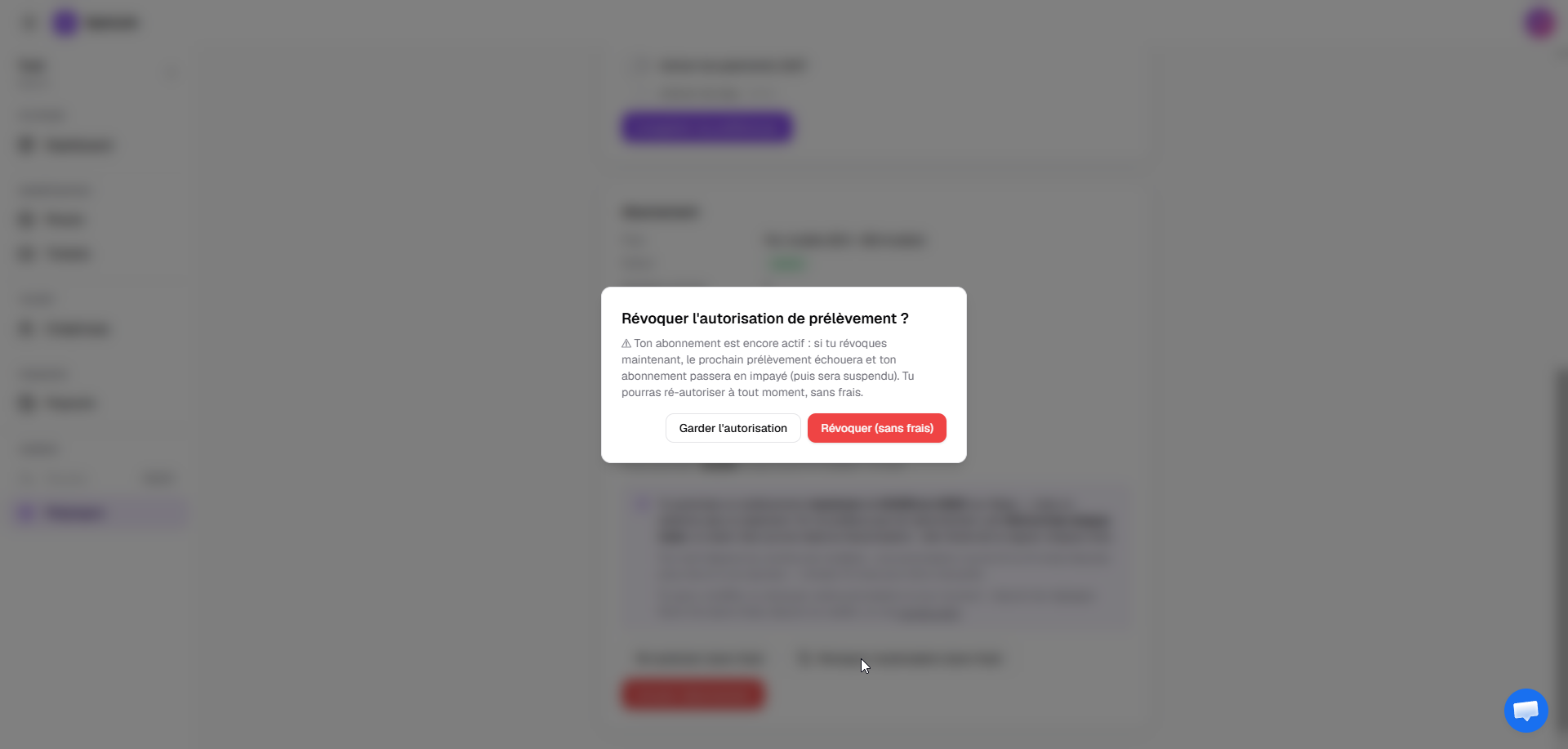
Just like the authorization, revoking is a simple free signature in your wallet — SpinLink relays it and pays the network fees:
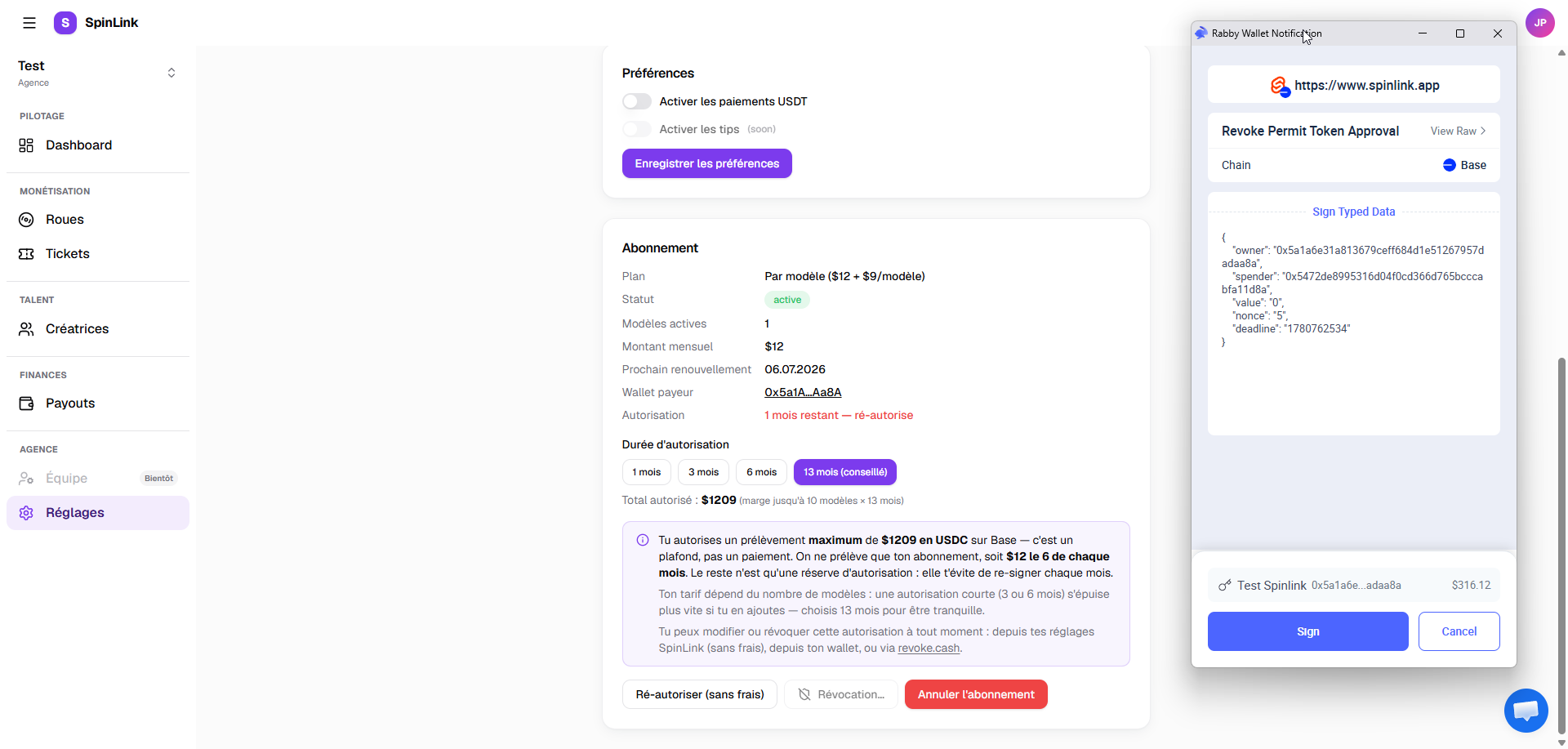
Once the subscription is cancelled and the authorization revoked, your settings confirm it in plain words:
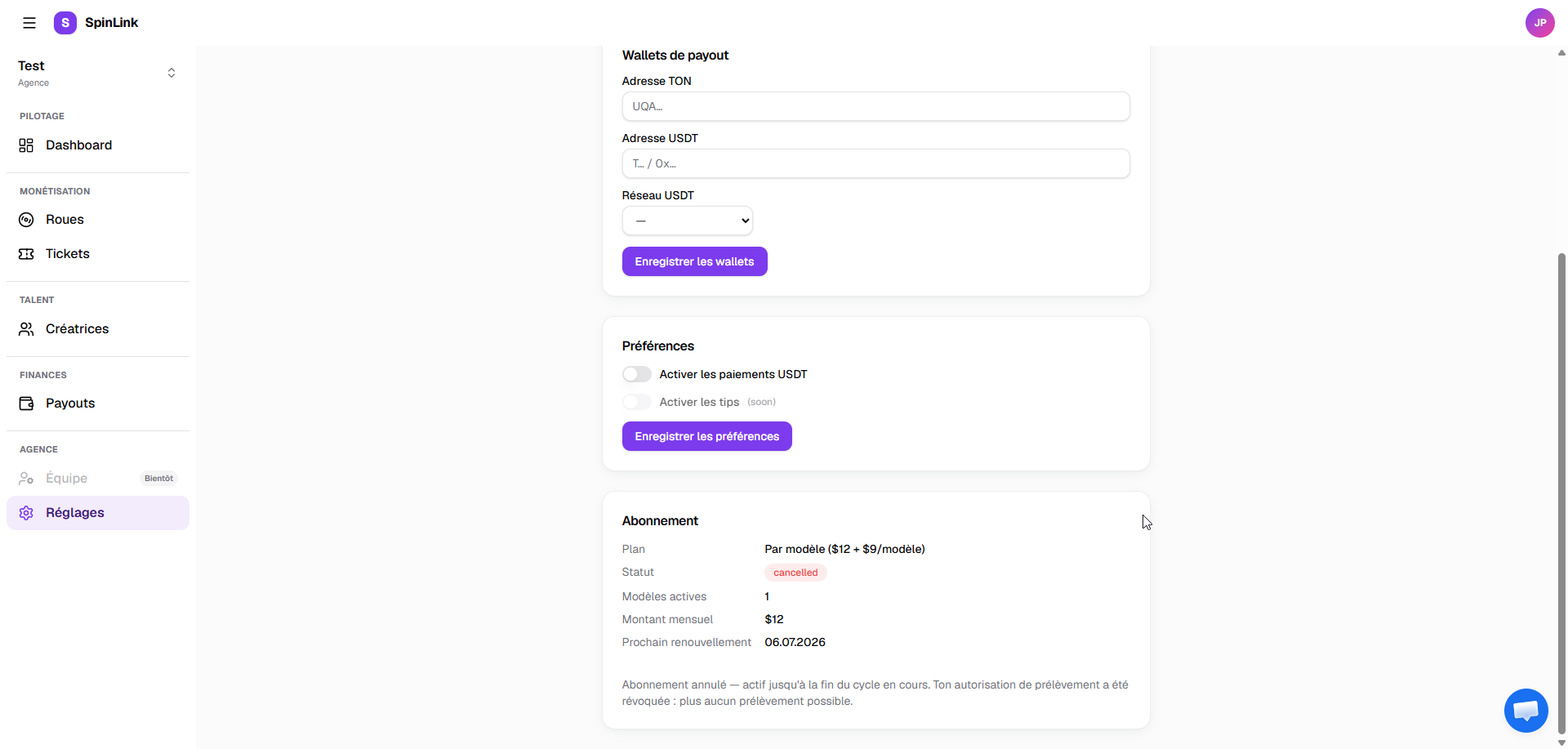
You can also revoke before cancelling — the app will simply warn you that the next debit will fail and the subscription will go past due.
Takeaway: one wallet, one free signature, and you’re set. Your money only leaves your wallet at the moment of the monthly debit, the cap protects you, and revocation is free and possible at any time — from SpinLink or outside it. That’s exactly what we wanted: a subscription nobody can cut off, and that only you control.
Frequently asked questions
Can SpinLink drain my wallet?
No, twice over. First, the authorization is capped at the amount you chose (1, 3, 6 or 13 months of subscription). Second, the system only pulls your monthly subscription, once a month — never more, never early. And you can check or cut the authorization at any time, including through tools that don't depend on us (revoke.cash).
Are my USDC locked up or deposited with SpinLink?
No. Your USDC only leave your wallet at the moment of the monthly debit, for the exact amount of your subscription. Between two debits, they stay with you, available, usable.
Which wallet should I pick?
Any WalletConnect-compatible wallet works: MetaMask, Rainbow, Coinbase Wallet, Trust Wallet… If you're new to this, Coinbase Wallet or Rainbow are the easiest to get started with on mobile.
I've never touched crypto, is that a problem?
Not at all. The flow is built for exactly that: you install a wallet (5 min), and the app guides you through getting USDC (by swapping, transferring, or buying by card). You don't need to understand blockchains — just that 1 USDC = $1 and that your money stays with you.
What happens if I forget to top up my wallet?
Nothing dramatic: a banner in the dashboard, 7 days to top up or re-authorize, and everything restarts automatically as soon as the payment goes through. Worst case, the account is temporarily suspended — your data and configs stay intact.
Can I change my paying wallet?
Yes: cancel the current authorization, then run the authorization flow again from your new wallet. For security, a wallet can only be linked to one active SpinLink account at a time.